Introducing Scripts: Securely Store and Reuse Code From Internet.

How many times you write a bash script, python, config file, Dockerfile, gitignore and other kind of script or configuration but ended up forgot where you use it or how you use it? Of course you can create it again, with help of AI and generator, but most of the time you need to tweak it again to your suitable use case. Well, we've been in that position, often.
So that’s why we create Scripts by Implementing Cloud 🎉. It’s like a pastebin or gist in steroid. Scripts not only save your script, but you can directly download or run using simple curl command. Not only that, Scripts will scan all the code uploaded to Scripts and give you a notes for best practice and security level, thanks to AI checker. We even give you warning or prevent you to run a public script that may dangerously make your computer havoc, steal your data or connect to suspicious server. No more worry about using code from internet. See the demo below and start storing your script in Scripts.

Scripts is a one of many dev tools that we build under Implementing.Cloud umbrella. While the main project is still under development, we proud that we finish the development of Scripts that will heavily used in the main project. Scripts also participate with Hashnode >< Hypermode in ModusHack Hackathon.
[Placeholder for demo video]
When we say Scripts will securing your script, don't take my word for it; look the code in Github. You can easily reproduce it by using my nix configuration. Simply run nix develop and you got all the requirements you need.
And while we was working on it, we create a PR for the use of JWKS documentation.
Initial System Design, Iteration and Exploration
We want our user interact with Scripts in two way:
Submit and browse their code via web app
Get or execute their code via terminal
To make sure there is no abuse to platform, only authenticated user can submit their code but everyone can download it. The submission is not a simple insert to database, but there will be some AI analysis to determine whether it follow best practice and most importantly is it secure or not to execute. We also wrap the original code with our predefined script to restrict the execution and give user some warning based on the analysis and community notes before the execution.
Actually we are really interested to utilize an automatic sandboxing in Modus by executing the script in the platform, but we don't have much time to explore and debug it.

After some time exploring modus, we learn several things (and detail about it in the next few sections):
We are using Go and it’s incredibly easy to make a function available for request
Currently modus only support GraphQL. I hope in the future I can see support for RESTful API (Achievable with API Gateway) and async request for background process, especially AI process without blocking user request (Achievable with embedding NATS outside modus).
It support Auth via JWT out of the box, but we have difficulties to mix private and public space
Because the sandboxing nature, we need to “whitelist” to external server. I use this to connect my database via PostgREST, connecting to PostgreSQL via RESTful API.
[Placeholder to talk about AI]
Comparing Syntax for Modus with FaaS
Let’s assume that we will have a function that receive a owner of the script and the name of the script and will return the Code struct like this. It will call a database but let’s leave it for later discussion.
type Code struct {
    Owner         string `json:"owner"`
    Name          string `json:"name"`
    CodeType      string `json:"code_type"`
    ScriptContent string `json:"script_content"`
}
First of all, let's see the contender
AWS Lambda
package main

import (
    "context"
    "encoding/json"
    "github.com/aws/aws-lambda-go/events"
    "github.com/aws/aws-lambda-go/lambda"
)

func GetCode(owner, name string) *Code {
    code := db.GetCode(owner, name)
    return &Code{
        Owner:         owner,
        Name:          name,
        CodeType:      code.Type,
        ScriptContent: code.Content,
    }
}

func handler(ctx context.Context, request events.APIGatewayProxyRequest) (events.APIGatewayProxyResponse, error) {
    owner := request.QueryStringParameters["owner"]
    name := request.QueryStringParameters["name"]

    code := GetCode(owner, name)

    responseJSON, _ := json.Marshal(code)
    return events.APIGatewayProxyResponse{
        StatusCode: 200,
        Body:       string(responseJSON),
    }, nil
}

func main() {
    lambda.Start(handler)
}
GCP Functions
package function

import (
    "encoding/json"
    "net/http"
)

type Code struct {
    Owner         string `json:"owner"`
    Name          string `json:"name"`
    CodeType      string `json:"code_type"`
    ScriptContent string `json:"script_content"`
}

func GetCode(owner, name string) *Code {
    code := db.GetCode(owner, name)
    return &Code{
        Owner:         owner,
        Name:          name,
        CodeType:      code.Type,
        ScriptContent: code.Content,
    }
}

func CodeHandler(w http.ResponseWriter, r *http.Request) {
    owner := r.URL.Query().Get("owner")
    name := r.URL.Query().Get("name")

    code := GetCode(owner, name)

    w.Header().Set("Content-Type", "application/json")
    json.NewEncoder(w).Encode(code)
}
Azure Functions
package main

import (
    "encoding/json"
    "net/http"
)

func GetCode(owner, name string) *Code {
    code := db.GetCode(owner, name)
    return &Code{
        Owner:         owner,
        Name:          name,
        CodeType:      code.Type,
        ScriptContent: code.Content,
    }
}

func CodeHandler(w http.ResponseWriter, r *http.Request) {
    owner := r.URL.Query().Get("owner")
    name := r.URL.Query().Get("name")

    code := GetCode(owner, name)

    w.Header().Set("Content-Type", "application/json")
    json.NewEncoder(w).Encode(code)
}

func main() {
    http.HandleFunc("/api/GetCode", CodeHandler)
    http.ListenAndServe(":8080", nil)
}
Cloudflare Worker
Worker known for Javascript runtime, but like Modus, Cloudflare Worker also available for Go by compile it to WASM.
package main

import (
    "encoding/json"
    "syscall/js"
)

func GetCode(owner, name string) *Code {
    code := db.GetCode(owner, name)
    return &Code{
        Owner:         owner,
        Name:          name,
        CodeType:      code.Type,
        ScriptContent: code.Content,
    }
}

func handleRequest(this js.Value, args []js.Value) interface{} {
    query := args[0]
    owner := query.Get("owner").String()
    name := query.Get("name").String()

    code := GetCode(owner, name)
    codeJSON, _ := json.Marshal(code)

    return js.ValueOf(string(codeJSON))
}

func main() {
    js.Global().Set("handleRequest", js.FuncOf(handleRequest))
    select {}
}
OpenFaas
package function

import (
    "encoding/json"
    "fmt"
    "net/http"
)

func GetCode(owner, name string) *Code {
    code := db.GetCode(owner, name)
    return &Code{
        Owner:         owner,
        Name:          name,
        CodeType:      code.Type,
        ScriptContent: code.Content,
    }
}

func Handle(w http.ResponseWriter, r *http.Request) {
    // Parse query parameters
    owner := r.URL.Query().Get("owner")
    name := r.URL.Query().Get("name")

    if owner == "" || name == "" {
        http.Error(w, "Missing owner or name query parameter", http.StatusBadRequest)
        return
    }

    // Get the code details
    code := GetCode(owner, name)

    // Respond with JSON
    w.Header().Set("Content-Type", "application/json")
    if err := json.NewEncoder(w).Encode(code); err != nil {
        http.Error(w, "Error encoding response", http.StatusInternalServerError)
        return
    }
}
Knative Functions
Open source solution that utilize Knative that work on top of Kubernetes.
package main

import (
    "encoding/json"
    "net/http"
)

func GetCode(owner, name string) *Code {
    code := db.GetCode(owner, name)
    return &Code{
        Owner:         owner,
        Name:          name,
        CodeType:      code.Type,
        ScriptContent: code.Content,
    }
}

func CodeHandler(w http.ResponseWriter, r *http.Request) {
    owner := r.URL.Query().Get("owner")
    name := r.URL.Query().Get("name")

    code := GetCode(owner, name)

    w.Header().Set("Content-Type", "application/json")
    json.NewEncoder(w).Encode(code)
}

func main() {
    http.HandleFunc("/", CodeHandler)
    http.ListenAndServe(":8080", nil)
}
Hypermode Modus
With Modus, we remove all the boilerplate of parsing request and response. The true function as a service.
func GetCode(owner, name string) *Code {
    code := db.GetCode(owner, name)
    return &Code{
        Owner:    owner,
        Name:     name,
        CodeType: code.Type,
        ScriptContent:   code.Content,
    }
}
As you can see, it’s incredibly easy to write Modus compared to other solutions. Especially, it already parse the request into our defined struct without manual binding.
Exploring Modus SDK and Runtime
I have quite a long discussion and reporting a bug in Hypermode discord. It’s fun to learn how the modus work, thanks to the beauty of open source. First we can see, beside modus dev, there is another things like “runtime” and “sdk”. We can use different version of runtime and SDK by installing it by using modus runtime install v0.14.3 or modus sdk install go v0.14.3, see the source of release in github release.

After it install, we can use the specific runtime by running modus dev -r v0.13.1. For SDK, add the version we want to use in the go.mod
module infinite-script

go 1.23.3

require github.com/hypermodeinc/modus/sdk/go v0.14.3 // indirect
There are a “hidden” tool that generate additional go code modus_pre_generated and modus_post_generated.go, it’s called modus-go-build that inside the .modus/sdk/go/<version> folder. Sometimes, it doesn’t install along with the modus sdk install command, so as a workaround I run GOBIN=~/.modus/sdk/go/v0.14.3/ go install github.com/hypermodeinc/modus/sdk/go/tools/modus-go-build@v0.14.3 manually. Well, I found the command after looking at the source code.

All SDK and runtime is saved under $HOME/.modus
Exploring GraphQL and Auth
This simple modus.json that came from template will generate this nice GraphQL Explorer when running locally.
{
  "$schema": "https://schema.hypermode.com/modus.json",
  "endpoints": {
    "default": {
      "type": "graphql",
      "path": "/graphql",
      "auth": "bearer-token"
    }
  }
}

As you can see, it has "auth": "bearer-token" but actually it will be still be public as long as we are not set MODUS_PEMS like defined in the doc here. But honestly I don’t like how we set it up since we need to put the public key (that has very sensitive even we miss a single newline character) in the JSON and serialize it in a single line of string. On the other hand, I use Authentik for my Auth Provider (Like auth0 or clerk, but self-hosted) and it support providing the public key by serve a JWKS endpoint. Does modus support it? Yes! Unfortunately undocumented.
I found it in the Changelog (what a great changelog!), it introduce at version v0.13.0 with this PR and a fix in version v0.14.0. TLDR, all you need is to add MODUS_JWKS_ENDPOINTS in .env.dev.local. If you deploy your app, don’t forget to add it in the dashboard.

MODUS_JWKS_ENDPOINTS='{"implementing.cloud":"https://auth.tegar.my.id/application/o/implementing-cloud/jwks/"}'
But you don’t need authentik to use JWKS, you can use your favorite auth provider and the popular one most likely have this feature shipped. The interesting part is we can have multiple auth provider at once!
Add Postman for Testing Auth Protected API
After we put MODUS_JWKS_ENDPOINTS or MODUS_PEMS, the built in GraphQL explorer will not work. It also quite a troublesome to copy-paste JWT token from network to use in our testing, especially if we set the life time of access token is only a few minutes.
Since I use OAuth 2.0 based with browser login, you can use Postman to automatically retrieve the token.

If success, you can get the schema and make a request with postman to Modus. Don’t forget to enable Using GraphQL introspection instead of import a GraphQL Schema.

Mixing Public and Private Route
Attempt #1: Make every functions behind authentication
This is my initial setup that I research above. But when integrating with frontend, I just realized that not all API should behind the auth, especially when get the script or list the public scripts. I ask in discord but unfortunately it’s not supported yet. They suggest I need to deploy 2 different app, but let’s try some workaround in the next attempt.
Attempt #2: Create 2 endpoints in modus.json
I try to modify the file with this configuration
{
  "$schema": "https://schema.hypermode.com/modus.json",
  "endpoints": {
    "private": {
      "type": "graphql",
      "path": "/private",
      "auth": "bearer-token"
    },
    "public": {
      "type": "graphql",
      "path": "/public",
      "auth": "none"
    }
  }
}
I try to run it locally and it work. Both endpoints will have the same schema and same target functions. I can add Public and Private in the function name and just reject unauthorized request that going to private.

Unfortunately, it’s currently not working when I deploy it. It’s looks like they hardcode /graphql path in the dashboard and only open that path, my non /graphql path like /private and /public return 404. Please check the discussion here.
Attempt #3: Create 2 deployment
Okay actually I want to make this my last attempt. So I try to make a monorepo, so multiple modus app in one app. It will help me shared the same code with ease. Modus github action template is awesome, it also have MODUS_DIR env. But unfortunately it’s not yet supported. Even though I have 2 CI and separate trigger, there is no way to specify this target should listen to which CI or path. So the current solution is implement with 2 projects with 2 different repositories.
Bonus Attempts: Add KrakenD API Gateway to make a RESTful API Request
GraphQL is offering a great flexibility to query data, so there will be no over-fetching in the client side. But if we publicly make the GraphQL available for everyone without limit, then it will be easily abused by bad actor. It’s usually call Nested Query Attack, like discussed in the stackoverflow. While I’m not sure Modus will suffer this attack (in my case, I can’t see how it possible) but the solution usually is to implement a persisted queris that looks like this, I’m not the fan of it though.
{
  "variables": {
    "path": "/article-path"
  },
  "extensions": {
    "persistedQuery": {
      "sha256Hash": "c205cf782b5c43c3fc67b5233445b78fbea47b99a0302cf31bda2a8e2162e1e6"
    }
  }
}
I will add API Gateway in front of them to make it easier to read, and additionally give more features like rate-limit, parallel query, logging, observability and hide our both public and private Modus deployment. I choose KrakenD because I have some experience with it, but every other API Gateway will also works. Honestly I wish Hypermode will provide it in the future out-of-the-box.
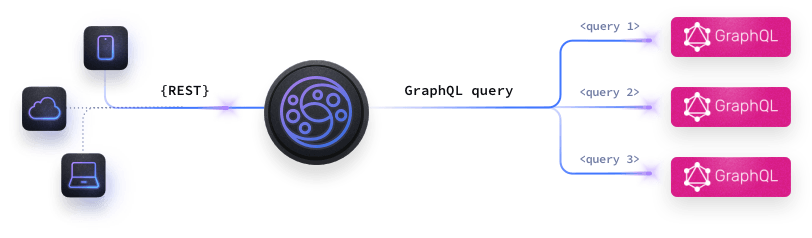
KrakenD is open source API Gateway that can connect to GraphQL. The example of the configuration is something like this.
{
    "endpoint": "/code/{username}/{scriptname}",
    "method": "POST",
    "backend": [
        {
            "timeout": "4000ms",
            "url_pattern": "/graphql?timeout=4s",
            "extra_config": {
                "backend/graphql": {
                    "type":  "mutation",
                    "query_path": "./graphql/mutations/code.graphql",
                    "variables": {
                        "user": "{username}",
                        "scriptname": "{scriptname}",
                        "other_static_variables": {
                            "foo": false,
                            "bar": true
                        }
                    },
                    "operationName": "addMktPreferencesForUser"
                }
            }
        }
    ]
}
Attempt #4: Back to #1 => make every functions behind authentication from API Gateway
Well, everything is a cycle. I just realize this approach after implementing API Gateway. Remember that we can have multiple JWKS and PEM in one app? Yes! Why not make the public route is accessible from public, but API Gateway will supply the authentication. With this implementation, I can remove my second application and all duplication I made.

Above are two requests against same deployed modus app. One is using OAuth 2.0 for User and the second one is using normal JWT created by jwt.io using my own private+public key pair. The JWT I create is using "sub": "service-account" and I arbitrary give the expired time 2099. Just make sure the JWT is not leaked :D.
Add Async Request for Background Process
Unlike other FaaS, modus doesn't have this feature built-in yet. Async request is great for detach current user request to run long running process in the background. But it doesn't mean we can't implement it with modus. Here is a workaround.
To make a async request, usually we need intermediary service as a broker. In this scenario I'm using nats and embed it in our existing go app to keep the architecture simple.
When functionA in modus finish to validate and save to database, it will send an async request to NATS with the inserted id and response to user. NATS that received the request will make another request to functionB in modus to run long running process: AI analysis. The process will have a 2 steps ideally, first using faster AI model we will evaluate the score of best practice and security risk. If there is a single potential risk, we will re-evaluate it with more advance AI model and ask for more comprehensive reasoning.

With this mechanism, we will get both benefit of run an advance model if needed or use smaller and cheaper model in most case without compromised user experience.
Final Design System

Code Implementation
Before we talk about code, we think it's wise to learn about what features will be provided to our users:
User can submit the code with type of runnable script or config file, more types coming soon. Additionally, user can add metadata like description and user steps (like custom input or change path).
After submission, modus call an async request. The request will detach user request, so no additional time to wait the request and we can run AI analysis in the background.
User can import script from URL, modus will get the scripts behind the scene and do the submission like usual.
User can browse uploaded scripts.
User can check scripts detail, including how to execute or get the config file, AI analysis result, AI and Community notes and of course the full scripts and wrapped scripts.
Additionally, you can ask AI to generate scripts for you.
[Placeholder for code]
Conclusion
Modus is really new but promising. In current state, we just wonder why not every Function as a Service done something like this. I’m amaze how fast I create the backend logic. Not mentioning this is my first time creating an API with LLM capabilities and compiling to WASM, even though all of it is abstracted by modus. Most of the time working in this project is mostly in the frontend side and read the internal of modus.
Here is summary of some feedback I mention above that I hope Hypermode can add in the future:
RESTful API / API Gateway capabilities or built-in integration
Async / Event Based Request
Mixing public and private endpoint or schema
Monorepo deployment
Nevertheless, it was really enjoyable journey. Thank You.
Nb: Even though in this article we use “we” as a author, in reality only me without a team doing all the things :D
Comments
Join the discussionNo comments yet. Be the first to comment.

